Multi-Outlet Kitchen Management Software for UK Hotels & Venues
🍴 View productivity on each OutletA hotel running a fine-dining restaurant, a bistro and a banqueting kitchen isn't one kitchen — it's three, each with its own team, its own fridges and its own way of doing things, all under one roof. Outlets lets a single property split into named outlets — each with its own staff list, its own temperature logs, its own rota and its own compliance record — so a quiet night in one never hides a missed check in another, while the property is still run, and inspected, as one premises.

The Problem
A fine-dining room and a casual bistro under the same roof don’t run the same shift pattern, don’t hit the same fridge temperatures at the same times, and often don’t even share the same head chef — but on most kitchen software, they’re forced to share one rota, one temperature log, and one compliance score. That means a quiet night in the bistro can mask a missed check in fine dining, and no head chef can see — or answer for — their own kitchen on its own.
Outlets exists for exactly this shape of business: more than one genuinely separate food and beverage operation under one roof, that still needs to look and behave like one property to the owner and like separate, individually accountable kitchens to everyone running them day to day.
Who This is For
Module compliance & Record Keeping

One Property, Separately Auditable Outlets
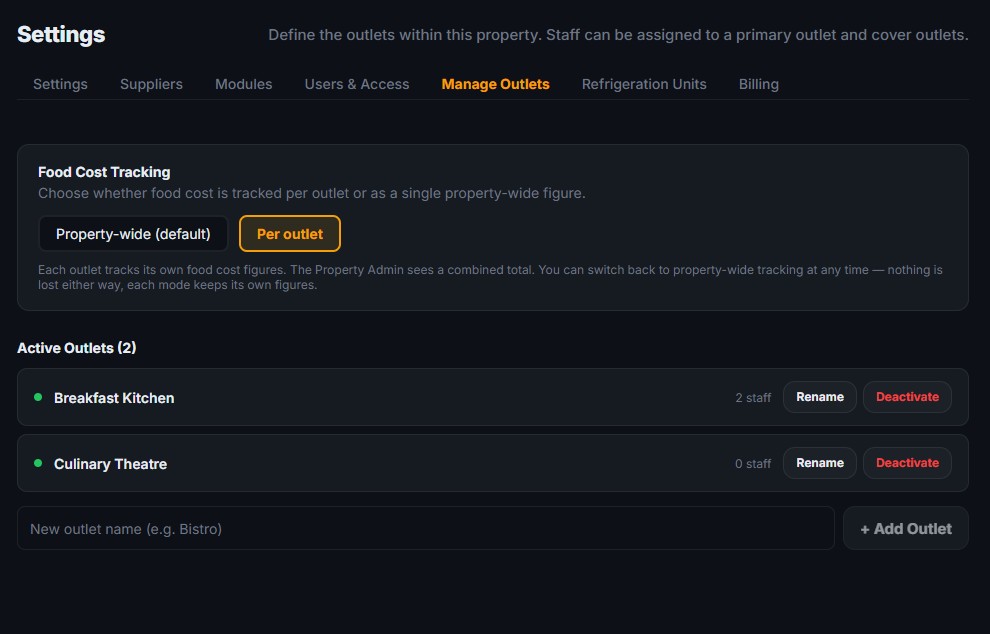
Every outlet keeps its own temperature logs, checklists, rota, and food cost record. Outlet Managers and their teams see their own outlet's records and compliance score, while Property Admins can switch between outlets or view the whole property together. Because every outlet sits within the same premises, an EHO inspects the property as a whole — and the inspection pack covers every outlet, so nothing is missing on the day.
What you can do with this module
Split a single property into named outlets
such as “Bistro” and “Fine Dining”, each behaving as its own self-contained kitchen.
Centralised or Decentralised Management
Give each outlet its own staff list, temperature logs, rota, procurement, food cost tracking and compliance score.
Outlet Managers
Set a primary outlet for each staff member, plus cover outlets for anyone who works across more than one outlet.
Keeping it all contained
Keep food cost and compliance reporting correctly scoped per outlet, so no outlet’s numbers get blended with another’s.
Empowerment
Let an Outlet Manager see and run only their own outlet, while a Property Admin or Super Admin can switch between outlets from one account.
Flexibility
Add or remove outlets as the business grows or consolidates — up to 5 per property as standard — without starting a new account.
No — existing records stay exactly where they are. Enabling Outlets simply lets you start assigning new staff, shifts, and logs to named outlets going forward.
Yes — give them a primary outlet for their main base, plus cover outlets for anywhere else they pick up shifts. They’ll see shifts and logs for both.
No — each outlet’s score is worked out from its own logs and checklists. The only shared records are property-wide checks that apply to every outlet.
No — an Outlet Manager’s access is locked to their own outlet. Only Property Admins and Super Admins can see across all outlets.
A single-property account can have up to 5 outlets as standard, all within the same premises. If you run a larger single-site operation, get in touch and the limit can be raised. Separate locations are set up as separate properties, not outlets.
You Need Answers !
To make an educated decision, you have Questions that need answers
We will try to do that but incase we dont please contact us