Staff Dashboard
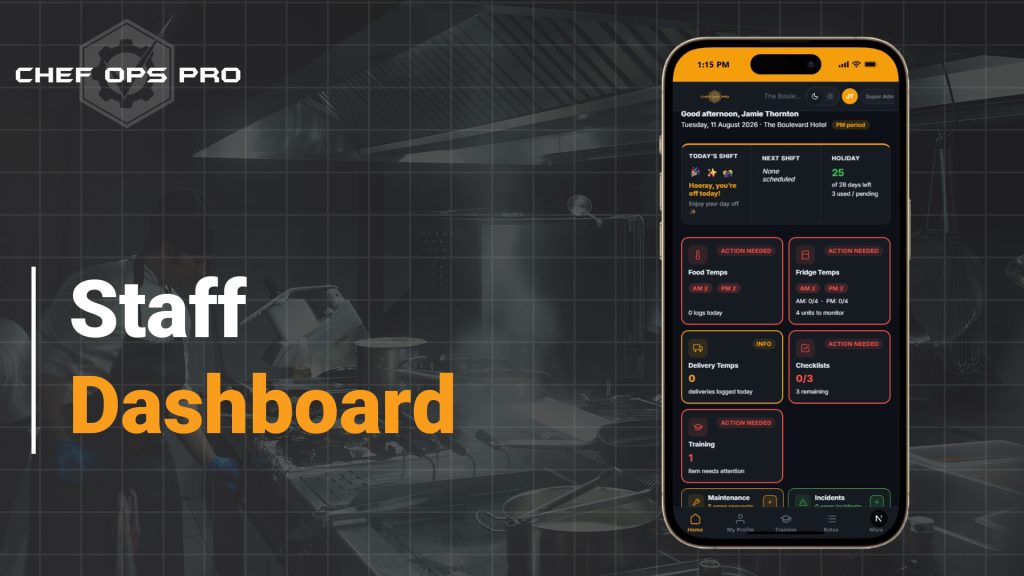
🍴 One Screen. Everything Outstanding. Before/During/After Service.The Dashboard is the first screen every team member sees when they log in. It knows who they are, which property they are on, and whether it is the AM or PM period — then shows exactly what is still outstanding for that shift. Food temps, fridge temps, delivery checks, checklists, training, maintenance and incidents, each colour-coded so a gap is visible at a glance rather than discovered a fortnight later.

The Problem
In most kitchens, knowing what still needs doing is a memory exercise. The morning fridge temperatures may or may not have been recorded. The PM food temps may or may not have been done before the closing chef left. A training item may have been outstanding for three weeks with nobody aware of it. None of it sits in one place, so it falls to whoever is most conscientious — usually the head chef — to hold the whole operational picture in their head and chase the gaps manually across a busy service.
That model breaks under pressure. It breaks on a Saturday night, it breaks when the head chef is on leave, and it breaks hardest during staff turnover, when a new starter has no way of knowing what a complete shift is even supposed to include. The consequence is not just operational friction — it is incomplete compliance records, discovered weeks later when the gaps can no longer be honestly filled. Chef-Ops-Pro’s Staff Dashboard removes the memory dependency entirely. Each team member opens the app to a personalised summary of their property showing what is done, what is outstanding, and what is overdue, split by AM and PM period. Compliance stops being something staff have to remember and becomes something they simply work through.
Who This is For
Module compliance & Record Keeping

Every outstanding record made visible — before it becomes a missing one
The compliance value of the Dashboard is preventative rather than retrospective. A missing fridge temperature discovered during an EHO inspection is a serious problem; the same missing log showing as AM 0/4 on screen at ten in the morning is a two-minute fix. By counting completed records against expected records, per period and per property, the Dashboard closes the window in which compliance gaps go unnoticed. That precision matters. The Dashboard does not simply indicate that something is outstanding — it shows how much: four fridge units to monitor, none logged for AM, none for PM; three checklists remaining; one training item needing attention; five open maintenance requests. Each figure is tied to the named, photo-identified user account that appears throughout the platform, so completion is attributed to a specific individual and timestamped accurately at the point of work, rather than backfilled from memory at the end of the week. During an inspection, a demonstrable pattern of records completed on time and in period — rather than in a single retrospective batch — is precisely the evidence of an active, functioning food safety management system that inspectors are looking for.
What you can do with this module
Open straight into a personalised shift summary
The Dashboard greets each team member by name and shows the date, the property they are working, and whether the platform is currently in the AM or PM period — so the information on screen is always relevant to the shift in progress.
See AM and PM logging status separately
Food temps and fridge temps are tracked by period, with a clear tick or cross for AM and PM. A completed morning round does not hide an empty evening one.
Know exactly how much is outstanding, not just that something is
Counts are explicit — AM 0/4, PM 0/4, four units to monitor, 0/3 checklists with three remaining — so staff know the size of the job before they start it.
Read status by colour in seconds
Cards are colour-coded by urgency: red for action needed, amber for informational items, green for clear. The whole kitchen’s position is readable at a glance from across the pass.
See your shift, your next shift and your holiday in one place
Today’s shift status, the next scheduled shift, and remaining annual leave — days used, pending and left — sit at the top of the Dashboard without navigating to another module.
Track training items that need attention
Outstanding training and e-signature items are surfaced directly on the Dashboard, so expiring or incomplete records are addressed before they lapse rather than at audit.
Monitor maintenance, incidents and stock at a glance
Open maintenance requests, active incidents and pending stock orders appear as compact live counters, each with a quick-add button to raise a new item without leaving the Dashboard.
Log a new entry without hunting for it
Quick-add controls let staff raise a maintenance request, report an incident or start an order directly from the Dashboard, cutting the friction that stops issues being reported at all.
Switch property without logging out
Multi-site users select their property from the header and the entire Dashboard reloads to that venue’s live position — essential for area managers covering several kitchens.
Choose light or dark mode
A display toggle lets staff run the Dashboard in dark mode for low-light prep areas and evening service, or light mode for bright kitchens and office use.
Works on any device, on the pass or off site
Fully mobile-responsive, so the same operational picture is available on a phone in the kitchen as on a desktop in the office — which is how most staff will actually use it during service.
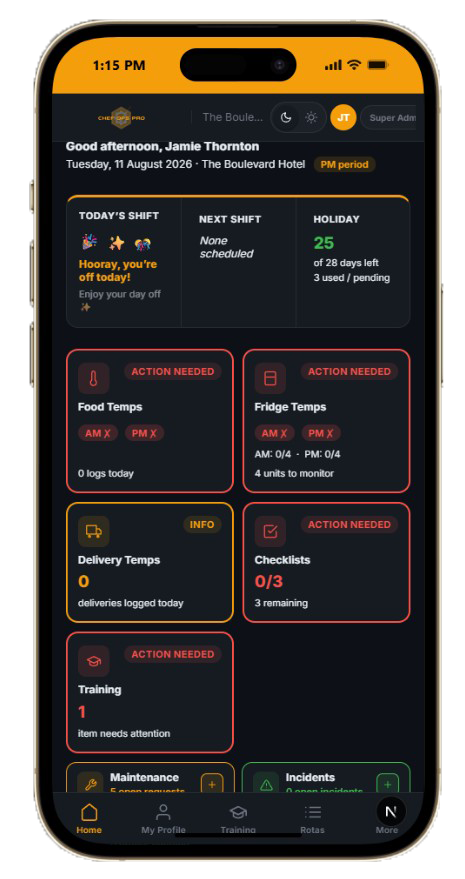
The Dashboard opens with a personalised greeting, the current date, the property they are working on, and whether it is the AM or PM period. Beneath that sits their shift and holiday summary, followed by status cards for food temps, fridge temps, delivery temps, checklists and training — each showing whether action is needed and precisely how much remains outstanding.
Temperature logging is tracked against both periods independently. Fridge temps, for example, display an AM and a PM indicator with a count against each — such as AM 0/4 and PM 0/4 where four units are monitored. A completed morning round is recorded as complete without masking an outstanding evening one, which is where most logging gaps occur in practice.
Red indicates action needed — a required log or task is outstanding. Amber indicates informational status, such as no deliveries logged today where none may have been due. Green indicates the item is clear with nothing outstanding. The colour coding is deliberately readable at distance so a manager can assess the kitchen’s position without stopping to read detail.
No. The Dashboard is scoped to the property currently selected in the header. Multi-site users with the appropriate permissions can switch property to view another venue’s live position, but staff assigned to a single site see only that site’s data — keeping the screen relevant and preventing cross-site confusion.
No — it is the front door to them. The Dashboard tells you what is outstanding and links through to the relevant module to complete it, whether that is a fridge temperature log, a HACCP checklist, a training sign-off or a maintenance request. Quick-add buttons on the maintenance, incidents and stock rows let staff raise a new item without navigating away at all.
Because staff should not have to go looking for their own information. Annual entitlement, days used or pending, and days remaining appear alongside today’s shift and the next scheduled one, giving each team member their personal position at the same moment they see their operational one. Full leave management and requests remain in the Holiday Management module.
Yes. The Staff Dashboard is fully mobile-responsive, giving kitchen teams the same view of outstanding logs, counters and alerts on a smartphone or tablet in the kitchen as they would get on a desktop. Dark mode makes it comfortable to read in low-light prep areas and during evening service.
You Need Answers !
To make an educated decision, you have Questions that need answers
We will try to do that but incase we dont please contact us